Are you struggling to fine-tune your AI-generated masterpieces?
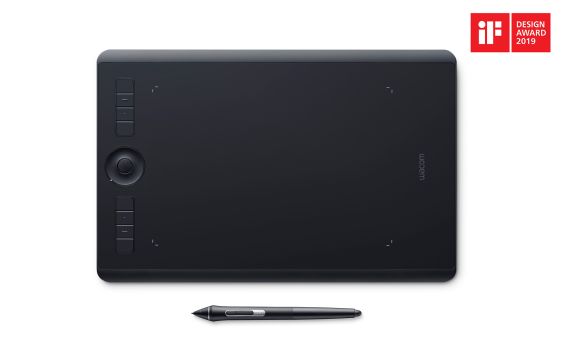
Have you ever felt frustrated by the clumsy precision of a mouse when trying to refine an AI-generated image? Or perhaps found yourself wishing you could ‘draw’ your prompts rather than just type them? As an AI power user, I’ve consistently encountered moments where the raw power of AI needs the nuanced touch of human input to truly shine. Today, we’re diving deep into the Wacom Intuos Pro Medium Pen Tablet to see if it’s the bridge connecting AI’s boundless potential with human precision.
Is this more than just a drawing tablet? Can it genuinely amplify your AI-centric workflow? Let’s explore its capabilities, pros, cons, and a critical take from an AI creator’s perspective.
Wacom Intuos Pro Medium: Key Specifications
| Feature | Detail |
|---|---|
| Active Area | 224 x 148 mm (8.8 x 5.8 in) |
| Pressure Levels | 8192 (Wacom Pro Pen 2) |
| Tilt Recognition | +/- 60 levels |
| Resolution | 5080 lpi |
| ExpressKeys™ | 8 (customizable) |
| Touch Ring & Multi-touch | Supported |
| Connectivity | USB, Bluetooth |
| Compatibility | Windows, macOS |
| Approx. Price | $379 USD |
The Good, The Bad, and The Honest Verdict
[Pros]
- Unparalleled Pressure Sensitivity: With 8192 levels, the Pro Pen 2 allows for incredibly nuanced control over line weight, opacity, and texture—critical for refining AI art with precision.
- Precise Tilt Recognition: Mimics natural brush strokes, invaluable for adding organic textures or fine-tuning masks in generative fill applications.
- Customizable ExpressKeys™: Streamlines workflow by mapping essential AI-related shortcuts (e.g., inpainting, masking, generative fill) directly to the tablet.
- Wireless Bluetooth Connectivity: Offers a clean, cable-free workspace, enhancing comfort during long creative sessions.
- Robust Build Quality: Feels premium and durable, designed for professional use and comfortable extended periods of work.
[Cons]
- Premium Price Tag: A significant investment for casual users or those new to digital art. You need to commit to utilizing its features.
- Steep Learning Curve for Newcomers: If you’re not accustomed to pen tablets, there’s an initial period of adjustment to eye-hand coordination.
- Surface and Nib Wear: Over time, the pen nibs and tablet surface can show wear, requiring occasional nib replacement.
- Medium Size Portability: While not huge, the medium size might not fit easily into smaller bags, making it less ‘grab-and-go’ than smaller alternatives.
Performance Deep Dive: Powering Your AI-Driven Creativity
Where the Wacom Intuos Pro Medium truly shines is in the refinement phase of AI creation. Imagine generating a stunning Stable Diffusion image, only to find a minor imperfection you need to address. Trying to accurately mask and inpaint with a mouse is akin to drawing with a brick. The Wacom pen, however, offers a natural, intuitive extension of your hand, allowing for pixel-perfect selections and brushwork. This translates to flawless inpainting, seamless outpainting, and precise control over generative fill features in Photoshop or other AI-powered editing suites.
Moreover, consider the power of visual prompting. Instead of endless text iterations, quickly sketch a pose, a composition, or even a rough texture on your Wacom. This sketch can then serve as an image prompt for Midjourney or Stable Diffusion, guiding the AI much more effectively than words alone. Once the AI generates its output, you can use the tablet to *hand-paint* corrections, blend elements, or add expressive details that give your AI art that unmistakable human touch. It’s not about replacing AI, but about elevating your dialogue with AI into a truly interactive, creative process.
My Critical Take: Is it Truly Indispensable?
Let’s be candid: The Wacom Intuos Pro Medium isn’t a universally indispensable tool for *every* AI power user. If your workflow primarily involves text-to-image generation with minimal post-processing, or if you’re not keen on adding a significant ‘human’ element to your AI output, then this might be an overkill investment. Its true value unlocks for those who wish to transform AI-generated content into truly unique, polished, and personalized masterpieces.
For artists migrating from traditional mediums or designers who understand the value of precise input, the transition will be smoother. However, for complete novices to pen tablets, expect a learning curve. The reward? A significantly enhanced ability to command and refine AI’s output, granting you a level of creative control that a mouse simply cannot provide. It becomes less about ‘prompt engineering’ and more about ‘AI co-creation‘.
The Verdict: Who Should Invest & Who Can Skip?
[Who should buy this tablet]
- Designers, illustrators, and digital artists requiring high-quality, precise retouching and refinement of AI-generated images.
- Professionals actively using AI-powered creative software (e.g., Photoshop Generative Fill, Topaz AI suite) and seeking to maximize workflow efficiency.
- Anyone experiencing wrist strain or discomfort from extended mouse usage during intensive digital work.
- Creators who want to accelerate visual ideation and sketching for AI prompts, enhancing their ability to communicate with generative models.
[Who should skip this tablet]
- Users who primarily generate AI images via text prompts and perform minimal to no post-processing.
- Those with a very limited budget, where investing in a more powerful GPU might offer a better return for their specific AI tasks.
- Individuals with little to no digital drawing experience and a low willingness to learn a new input device.
The Wacom Intuos Pro Medium transcends being just an accessory; it’s a vital link for AI-era creators, bridging human intuition with AI efficiency. It empowers you to not just use AI, but to truly collaborate with it, infusing your unique creative vision into every pixel.
🏆 Editor’s Choice
Wacom Intuos Pro Medium Pen Tablet
Best value model optimized for AI tasks
* Affiliate disclaimer: We may earn a commission from purchases.
#wacom #intuos-pro #pen-tablet #ai-art #digital-drawing