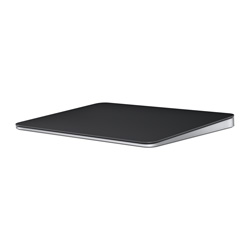
Are you constantly frustrated by wrist fatigue from repetitive mouse movements, or do you miss the fluid gestures of your MacBook’s built-in trackpad when using a desktop? Today, I’m bringing you an honest review of the Apple Magic Trackpad (Black), an accessory that promises to make your Apple ecosystem experience truly ‘magical’. This isn’t just another peripheral; it’s a potential game-changer for your digital workflow. I’ve put it through its paces to uncover its true value.
Key Specifications at a Glance
| Feature | Detail |
|---|---|
| Color | Black |
| Connectivity | Bluetooth 4.0, Lightning Port |
| Battery Life | Approx. 1 month on a single charge |
| Dimensions (LxWxH) | 16.0 x 11.49 x 0.49–1.09 cm |
| Weight | 232 g |
| Key Features | Force Touch, Multi-Touch Gestures |
| Compatibility | macOS 10.11 or later, iPadOS 13.4 or later |
| Price (approx) | $149 USD |
The Good, The Bad, and The Black: My Honest Experience
After several weeks of making the Black Magic Trackpad my primary input device, I’ve gathered my candid thoughts. Let’s break down what truly impressed me and where I felt there was room for improvement.
👍 The Pros
- Unrivaled Gesture Support: The seamless integration with macOS and iPadOS gestures is simply unmatched. Scrolling, zooming, app switching, Mission Control – every interaction feels incredibly fluid and intuitive, significantly boosting productivity.
- Exceptional Precision: For creative tasks like graphic design or video editing, the pixel-perfect cursor control is a godsend. It offers a level of accuracy that traditional mice often struggle to achieve.
- Force Touch: This pressure-sensing technology introduces new layers of interaction. Quick Look previews, defining words, renaming files – it all feels incredibly natural and saves precious seconds.
- Sleek Black Aesthetic: It perfectly complements a minimalist Apple desktop setup. The black finish is not only gorgeous but also hides fingerprints and dust much better than its white counterpart.
- Long Battery Life: A single charge lasts approximately a month, meaning I rarely worried about running out of power.
- Reduced Wrist Strain: My wrist felt noticeably less fatigued during long working sessions compared to using a traditional mouse.
👎 The Cons
- Premium Price Tag: There’s no getting around it, the Magic Trackpad is a significant investment. This can be a barrier for budget-conscious users.
- Charging Port Placement: The Lightning port is inconveniently located on the bottom, meaning you cannot use the trackpad while it’s charging. This is a design flaw that truly needs addressing.
- Learning Curve: Users accustomed to mice might require a brief adjustment period. However, once mastered, it’s hard to go back.
- Limited Windows Functionality: While it technically works with Windows, the rich gesture experience is largely confined to the Apple ecosystem. Its true value shines brightest on macOS and iPadOS.
Deep Dive into Real-World Performance: More Than Just an Accessory?
As a digital productivity expert who juggles document creation, web research, and light video/graphic design, the Black Magic Trackpad unequivocally enhanced my workflow efficiency. The moment I truly felt its ‘magic’ was during complex multitasking. Seamlessly switching between multiple apps, editing images, and responding to messages—all with just a few finger swipes—was a revelation. This would have required numerous wrist movements with a traditional mouse. The Force Touch feature, while subtle, genuinely adds to the convenience. For instance, quickly looking up a word definition on a webpage with a firm press saved me countless clicks and context switches.
However, it’s important to provide a critical take: this isn’t for everyone. If you’re a hardcore gamer requiring pinpoint aiming, a dedicated gaming mouse will always be superior. Similarly, if you’re on a tight budget, the premium price might be hard to justify. Windows users will also find its gesture capabilities significantly curtailed, limiting its overall value. I also highly recommend this to iPad power users; it extends the intuitive touch experience of iPadOS to a desktop-like setup in a way no mouse can.
The Final Verdict: Who Needs This Black Beauty?
The Apple Magic Trackpad (Black) is a strong recommendation for anyone deeply invested in the macOS or iPadOS ecosystem, especially those seeking precise control and maximum multitasking efficiency. Once you adapt, you’ll likely find it difficult to return to a traditional mouse. However, as discussed, if high-performance gaming or Windows-centric workflows dominate your usage, or if your budget is constrained, you might want to reconsider. For me, and for those who truly aim to elevate their efficiency within the Apple ecosystem, this black trackpad offers a ‘magical experience’ that goes far beyond a mere input device.
🏆 Editor’s Choice
Apple Magic Trackpad
Best value model optimized for AI tasks
* Affiliate disclaimer: We may earn a commission from purchases.
#Apple Magic Trackpad #Black Trackpad #macOS Accessory #Force Touch #Productivity Tool