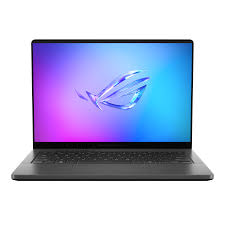
Tired of your current laptop choking on complex AI models or demanding creative tasks while you’re on the go? Many of us, myself included, have hit the ‘Out of Memory’ wall one too many times with ultra-portable machines. Enter the ASUS ROG Zephyrus G14 (2024) – a laptop that promises workstation-level performance in a sleek, portable chassis. But can this compact marvel truly deliver for serious AI workflows? I’ve put it through its paces, and here’s my honest take.
Unpacking the Power: Key Specs at a Glance
Before diving into performance, let’s look at what’s packed inside this slim machine. It’s truly impressive how much hardware ASUS has managed to squeeze into a 14-inch form factor.
| Category | Specification |
|---|---|
| Processor | AMD Ryzen AI 9 HX 370 (12 Cores, 24 Threads) with NPU |
| Graphics | NVIDIA GeForce RTX 4070 Laptop (8GB GDDR6 VRAM) |
| Memory | 32GB LPDDR5X (Soldered) |
| Storage | 1TB PCIe 4.0 NVMe SSD |
| Display | 14-inch ROG Nebula OLED, 2.8K (2880 x 1800), 120Hz, G-Sync |
| Battery | 73Whr |
| Weight | Approx. 1.5 kg (3.31 lbs) |
| Operating System | Windows 11 Home/Pro |
My Honest Take: The Pros & Cons of the Zephyrus G14 (2024)
After spending considerable time with this machine, here’s what truly stood out, for better or worse:
- The Good:
- Unrivaled Portability: Weighing just 1.5kg, it’s mind-boggling to have an RTX 4070 in such a light and sleek package. Perfect for carrying between meetings or coffee shops.
- Stunning OLED Display: The 2.8K 120Hz OLED panel is a visual feast. Colors pop, blacks are inky, and the high refresh rate makes everything feel incredibly smooth. Ideal for creative work and consuming AI-generated media.
- Potent AI Horsepower: The combination of the RTX 4070 and the AMD Ryzen AI 9 HX 370’s NPU delivers impressive performance for Stable Diffusion and local LLM inference. The NPU specifically shines for Windows Studio Effects and Copilot features, offloading tasks and improving efficiency.
- Premium Design: The full aluminum unibody chassis feels incredibly robust and looks sophisticated. It doesn’t scream ‘gaming laptop,’ which is a huge plus for professional environments.
- The Not-So-Good:
- VRAM Limitation: The 8GB VRAM on the RTX 4070 is the biggest bottleneck for serious AI work. While competent for most tasks, I consistently hit VRAM limits when pushing SDXL with larger batch sizes or trying to run more complex local LLMs efficiently.
- Soldered RAM: 32GB LPDDR5X is a good amount, but the inability to upgrade it later is a long-term concern for those who foresee needing more memory down the line.
- Thermals & Noise Under Load: While the cooling system is impressive for the form factor, sustained heavy AI workloads or gaming will inevitably cause the fans to spin up significantly, and the chassis can get quite warm. It’s a trade-off for such a slim design.
Performance Deep Dive: My AI Workflow Experience
As an AI power user, I focused my testing on specific applications:
Stable Diffusion (SDXL):
For SDXL at 1024×1024, I observed generation times of roughly 4-5 seconds per image. This is quite fast for a portable machine. However, when I attempted to increase the batch size beyond 2 or stack multiple complex LoRAs, I frequently encountered ‘Out of Memory’ errors. For casual generation and idea iteration, it’s excellent, but it won’t replace a high-VRAM desktop GPU for professional artists needing large batch generations or extensive fine-tuning.
Local LLM Inference:
With 32GB of RAM and the RTX 4070, I had no trouble running 7B-13B parameter models like Llama 3 8B (quantized to Q4_K_M). Token generation speeds were snappy, providing a smooth experience for coding assistance and general queries. However, trying to load larger models (e.g., 70B+) quickly pushed the VRAM and RAM limits, requiring significant CPU offloading, which severely impacts performance.
Python Machine Learning Training:
For small to medium-sized datasets and models (e.g., typical Kaggle competitions or tutorial projects), the G14 performed admirably with TensorFlow and PyTorch. It’s a fantastic learning and experimentation platform. Yet, for larger image datasets or complex transfer learning scenarios, the 8GB VRAM limitation once again became apparent, hindering training times compared to a desktop-class GPU.
The AMD NPU in Action:
The integrated AMD Ryzen AI 9 HX 370 NPU is a dedicated chip for AI tasks. While direct integration with PyTorch/TensorFlow for general training is still evolving, I noticed its benefits in system-level AI features. Tasks like background blurring in video calls (Windows Studio Effects) or accelerating local Copilot functions ran seamlessly without taxing the CPU or GPU significantly. This points to a promising future for on-device AI acceleration.
The Verdict: Who Needs This, and Who Should Skip It?
The ASUS ROG Zephyrus G14 (2024) is undoubtedly an impressive piece of engineering. But like any tool, it has its ideal user.
I highly recommend the Zephyrus G14 (2024) for:
- Mobile AI Developers & Artists: If you frequently need to work on AI projects outside a dedicated workstation, this is an unparalleled option. The combination of power and portability is unmatched, especially with that gorgeous OLED screen for reviewing outputs.
- Creative Professionals Needing AI Acceleration: Video editors, graphic designers, and 3D artists who leverage AI tools for upscaling, denoising, or content generation will appreciate the potent GPU and NPU on the go.
- Users Prioritizing Design & Portability with Serious Power: If you want a premium, sleek laptop that doesn’t scream ‘gaming machine’ but can still handle demanding tasks including gaming, this is a top contender.
You might want to reconsider if:
- Your Primary Work Involves Large-Scale Deep Learning or Massive LLMs: The 8GB VRAM, while capable, will be a limiting factor for heavy-duty AI research, large-batch SDXL generation, or running 70B+ parameter LLMs efficiently. You’ll need an RTX 4080/4090 laptop or a desktop GPU for that.
- You’re On a Strict Budget for Pure AI Compute: For raw performance per dollar in AI, a custom-built desktop PC with a higher-tier GPU will almost always offer better value, sacrificing portability, of course.
In conclusion, the ASUS ROG Zephyrus G14 (2024) perfectly fulfills the niche of a ‘portable AI workstation.’ While the VRAM limitation is a critical take, the sheer engineering feat of packing this much AI-capable power into such a svelte and beautifully designed chassis is commendable. If portability is a non-negotiable part of your AI workflow, this laptop will exceed your expectations.
🏆 Editor’s Choice
ASUS ROG Zephyrus G14
Best value model optimized for AI tasks
* Affiliate disclaimer: We may earn a commission from purchases.
#ASUS #Zephyrus G14 #AI laptop #RTX 4070 #laptop review