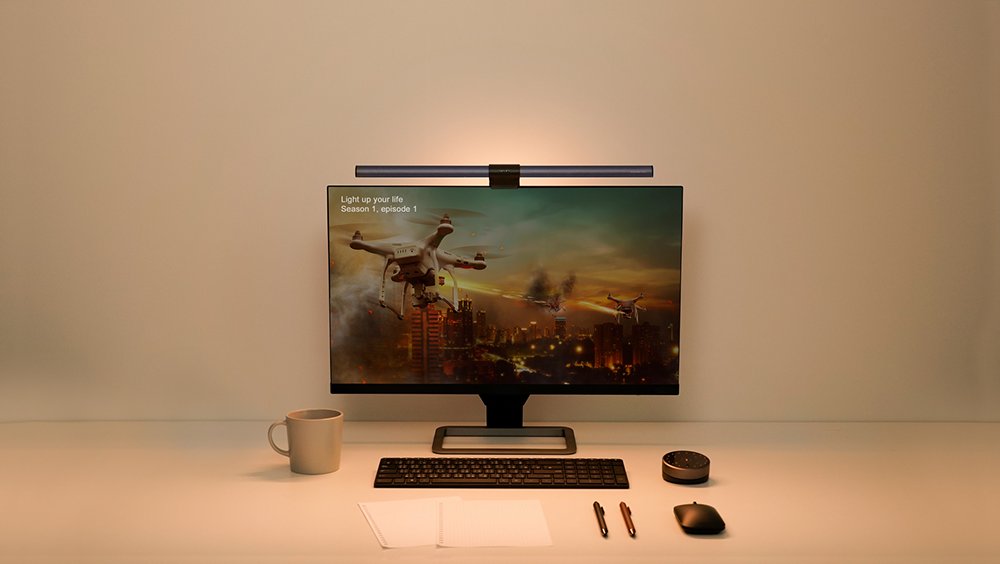
As an AI developer, my eyes are my most critical asset. We spend countless hours training models, debugging complex code, and poring over research papers. This often means battling screen glare, struggling with inadequate ambient lighting, and ultimately succumbing to the dreaded eye fatigue and headaches that plummet productivity. I’ve been there, more times than I care to admit, feeling my focus wane and errors creep in due to tired eyes.
It was this constant struggle that led me to explore dedicated solutions, and ultimately to the BenQ ScreenBar Halo Monitor Light. Could this sleek, innovative light truly transform my demanding AI development environment? I’ve put it through its paces, and here’s my honest review and verdict.
BenQ ScreenBar Halo: Key Specifications for the Discerning Professional
Before diving into my experience, let’s look at what the ScreenBar Halo brings to the table. These are the core features that differentiate it from a standard desk lamp.
| Feature | Detail |
|---|---|
| Light Source | Dual-light design (Front screen light + Rear ambient backlight) |
| Color Temperature | 2700K (Warm White) to 6500K (Cool White) |
| Color Rendering Index (CRI) | >95 (Excellent color accuracy) |
| Control Method | Wireless Rotary Dimmer (2.4GHz) |
| Power Source | USB Powered (USB-C cable included), 5V/1A |
| Key Functions | Auto-dimming, No Screen Glare, Flicker-Free, Ambient Light Compensation |
| Price | Varies by region and retailer (Approx. $179 USD) |
Deep Dive: How the ScreenBar Halo Boosts My AI Productivity & Focus
The most profound impact the ScreenBar Halo has had on my workflow is the ability to maintain ‘sustained concentration’. Before, long nights of coding inevitably led to painful eye strain, forcing breaks or resulting in costly errors. With the Halo, these issues have significantly diminished.
The dual-light design is, frankly, revolutionary. The front light illuminates my desk space evenly without any screen glare, ensuring my keyboard and notes are perfectly visible without shadows. Crucially, the rear ambient backlight projects a soft glow onto the wall behind my monitor, reducing the contrast between the bright screen and a dark background. This subtle yet powerful feature dramatically lowers eye fatigue. Whether I'm meticulously crafting Stable Diffusion prompts, fine-tuning LLM architectures, or debugging complex Python scripts, I can stay immersed for extended periods with unparalleled comfort.
The wireless controller is another stroke of genius. Its intuitive dial allows for effortless adjustment of brightness and color temperature. Even better, the ‘auto-dimming’ feature intelligently calibrates the light to match my surroundings, providing an optimal work environment without constant manual tweaks. For complex AI projects with demanding timelines, this consistency in lighting is absolutely critical for maintaining peak focus and reducing mental load.
BenQ ScreenBar Halo: The Pros & Cons Under Scrutiny
✅ The Upsides (Pros)
- Unparalleled Eye Comfort: Zero screen glare, flicker-free operation, and ambient backlight drastically reduce eye strain during prolonged use.
- Superior Light Customization: Wide color temperature range (2700K-6500K) and precise brightness control to suit any task or environment.
- Innovative Wireless Controller: Intuitive, space-saving, and incredibly convenient for on-the-fly adjustments.
- Intelligent Auto-Dimming: Automatically optimizes light output based on ambient conditions, ensuring consistent comfort.
- High Color Accuracy (CRI >95): Beneficial for creative tasks, ensuring true color representation on your desk.
❌ The Downsides (Cons)
- Premium Price Point: A significant investment compared to conventional desk lamps.
- Monitor Compatibility: May not fit extremely thin or unusually shaped monitors perfectly.
- Wireless Controller Batteries: Requires periodic replacement of 3x AAA batteries.
- USB-A Power Requirement: Needs a USB-A port or adapter, as some modern setups are all USB-C.
The Verdict: Who Truly Needs the ScreenBar Halo? (A Critical Take)
The BenQ ScreenBar Halo is undeniably an ‘innovative and high-performance product’. For professionals like myself – AI developers, designers, writers, or anyone spending eight hours or more daily in front of a monitor engaging in complex, demanding tasks – it's more than just a light; it's a ‘productivity and health tool’. It directly enhances eye health and, by extension, work efficiency.
However, is it an absolute necessity for everyone? Honestly, no. For casual users who spend limited time at their computer, the premium price might be hard to justify. Similarly, if your workspace already has excellent ambient lighting, or if your monitor stand has an integrated light, you might not see the full benefit of this additional investment. This product truly shines for the ‘dedicated professional willing to invest in their eye comfort and sustained productivity’. For them, the ScreenBar Halo offers unparalleled value.
In my experience, this monitor light has significantly reduced post-coding fatigue and allowed me to maintain sharper focus during crunch times on AI projects. The BenQ ScreenBar Halo is not just a monitor light; it's an ‘essential guardian for digital eye health’ and a ‘powerful productivity booster’ for the modern professional. My final verdict stands firm: it's a game-changer for serious users.
🏆 Editor’s Choice
BenQ ScreenBar Halo Monitor Light
Best value model optimized for AI tasks
* Affiliate disclaimer: We may earn a commission from purchases.
#benq screenbar halo #monitor light review #eye care #desk setup #productivity tech