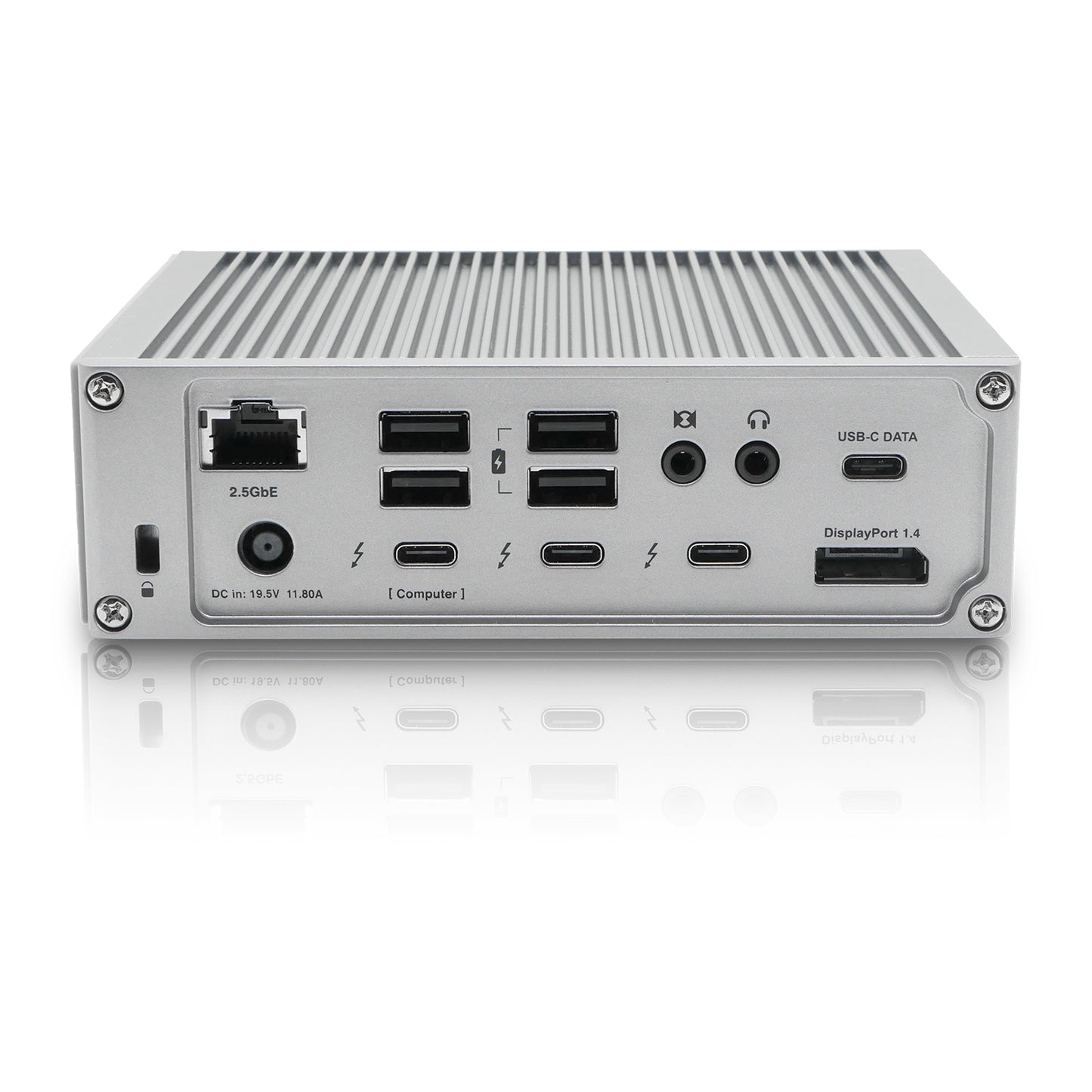
As someone who pushes their laptop to its limits daily – whether compiling complex code, running local AI models, or rendering 4K video – I’ve long battled the inherent limitations of modern, sleek notebooks. Limited ports, endless dongles, and the constant dance of plugging and unplugging peripherals are productivity killers. It’s a common struggle, and frankly, it’s exhausting. That’s why a robust docking station isn’t just a luxury for me; it’s an absolute necessity. Enter the CalDigit TS4 Thunderbolt 4 Dock: a device often hailed as the ‘King of Docks.’ But does it truly live up to the hype for a demanding AI power user?
CalDigit TS4 Thunderbolt 4 Dock: Key Specifications
| Feature | Detail |
|---|---|
| Upstream Connection | 1x Thunderbolt 4 (98W Power Delivery) |
| Downstream Thunderbolt 4 | 3x Thunderbolt 4 (40Gbps, 15W each) |
| USB-A Ports | 5x USB-A 3.2 Gen2 (10Gbps) |
| USB-C Ports | 3x USB-C (1x 3.2 Gen2 10Gbps, 2x 2.0 7.5W) |
| Ethernet | 1x 2.5 Gigabit Ethernet |
| Display Output | Up to Dual 4K@60Hz or Single 8K@30Hz (Host dependent) |
| Card Readers | UHS-II SD 4.0 & UHS-II microSD 4.0 |
| Audio | 3.5mm In/Out |
| Total Ports | 18 |
| Price (Approx.) | $350 – $400 USD (Premium segment) |
What I Love (The ‘Pros’)
- Unmatched Connectivity: Seriously, 18 ports cover everything. From legacy USB-A to multiple Thunderbolt 4, I rarely found myself needing another dongle.
- Blazing Fast Data Transfer: 40Gbps Thunderbolt 4 ports are a game-changer for external NVMe SSDs, essential for handling large AI datasets or 8K video files.
- 2.5 Gigabit Ethernet: A subtle but significant upgrade. Downloading large AI models or accessing network attached storage (NAS) feels noticeably snappier.
- Robust Power Delivery: 98W is enough to keep my MacBook Pro charged even under heavy CPU/GPU load, preventing battery drain during intensive tasks.
- UHS-II Card Readers: For photographers and videographers (and those generating synthetic datasets), transferring files from SD/microSD cards is incredibly fast.
- Premium Build Quality: The all-aluminum chassis feels incredibly solid and dissipates heat effectively.
Where It Falls Short (The ‘Cons’ & Critical Take)
- Premium Price Tag: Let’s not sugarcoat it – the TS4 is an investment. While justified for professionals, it’s definitely not for casual users.
- Physical Footprint: It’s a substantial piece of hardware. Make sure you have the desk space for it, as it’s not designed for minimalist setups.
- Display Limitations (M-series Macs): If you have a base M1/M2/M3 MacBook Air/Pro, you’re still limited to one external display *via the dock*. This is an Apple Silicon limitation, not the dock’s fault, but it’s important to set expectations. M1 Pro/Max/Ultra Macs handle dual displays perfectly.
- Requires External Power: Understandably, with all that power and connectivity, it needs its own dedicated power brick, adding to cable clutter *behind* the desk.
Performance Deep Dive: An AI & Productivity Perspective
Moving beyond the spec sheet, how does the TS4 actually perform in a demanding workflow? For AI developers and digital creators, **speed and reliability are paramount.** I tested the TS4 with a few real-world scenarios:
- External Storage for AI Data: Connected a Thunderbolt 4 NVMe enclosure. I saw consistent read/write speeds exceeding 2500 MB/s, which is critical for loading vast datasets for model training or quickly moving large generated images. This bandwidth means less waiting and more doing.
- Networking with 2.5GbE: When pulling large Docker images for local AI environments or syncing massive project files to a NAS, the 2.5GbE port offered a tangible boost over standard Gigabit Ethernet. It's not just a number; it translates to quicker iterations and smoother collaboration.
- Multi-Monitor Setup for Code & Monitoring: Running a dual 4K monitor setup allowed me to dedicate one screen to my IDE (VS Code, Jupyter Notebooks) and the other to real-time AI model performance monitoring, documentation, or design mockups. The stable display output, even during GPU-intensive tasks on the host, was flawless.
- Power for Peripherals: With multiple external SSDs, a high-res webcam, and a microphone connected, the TS4 handled power distribution without a hitch, ensuring no flaky connections or power drops. This stability is invaluable when you're in the middle of a critical training run.
The Verdict
So, is the CalDigit TS4 worth its considerable price tag? **For the right user, absolutely.** If you’re a professional AI developer, a video editor, a 3D artist, or any power user who juggles numerous peripherals and demands the absolute best in connectivity and performance, the TS4 is a game-changer. It consolidates a chaotic desk into a streamlined, powerful workstation. The stability, speed, and sheer number of ports make it an investment that pays dividends in productivity.
**However, if you’re a casual user, someone with only a few peripherals, or on a tight budget, you might be over-provisioning.** While excellent, its premium features come at a premium cost. Consider your actual needs. But for those of us who live and breathe high-performance computing, the CalDigit TS4 isn’t just a dock; it’s the central nervous system of our digital productivity.
🏆 Editor’s Choice
CalDigit TS4 Thunderbolt 4 Dock
Best value model optimized for AI tasks
* Affiliate disclaimer: We may earn a commission from purchases.
#CalDigit TS4 #Thunderbolt 4 Dock #Laptop Dock #Productivity #Workstation