Tired of Constant App-Juggling and Shortcut Overload?
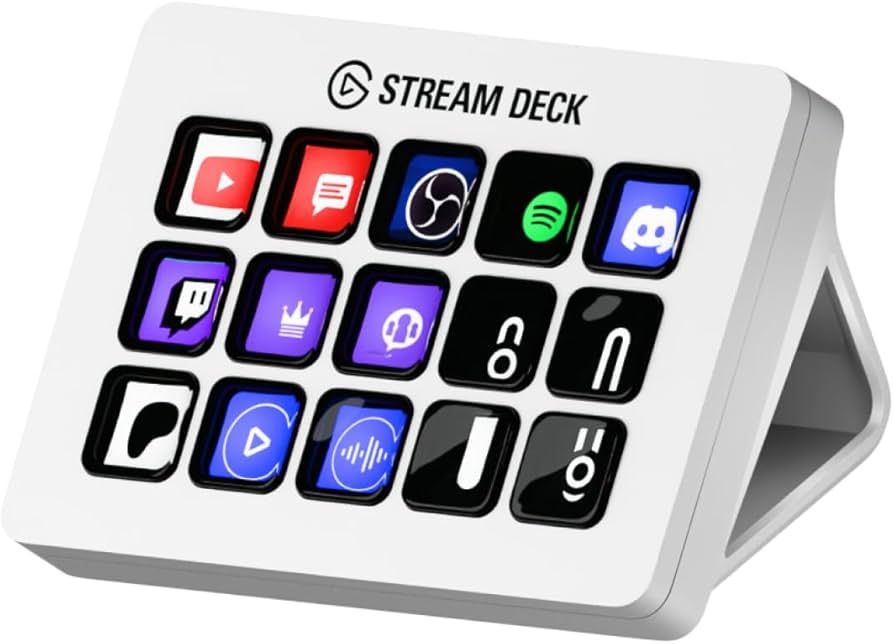
Are you constantly juggling applications, battling complex keyboard shortcuts, and wishing for a magic button to streamline your digital life? Especially when diving deep into demanding AI model training, script execution, or intricate data processing, that feeling of ‘shortcut fatigue’ is all too real. I’ve been there. After years of chasing productivity hacks, I finally found a tool that truly delivered: the Elgato Stream Deck MK.2.
Elgato Stream Deck MK.2: A Look at the Core Specs
| Feature | Details |
|---|---|
| Number of Keys | 15 customizable LCD keys |
| Interface | USB 2.0 Type-C to Type-A (Detachable cable) |
| Dimensions | 118 x 84 x 25 mm |
| Weight | 145 g (Excl. stand) |
| OS Compatibility | Windows 10 (64-bit), macOS 10.13 or later |
| Approx. Price | $149.99 USD (Varies by region) |
My Experience: The Good, The Bad, and The Essential
Pros:
- Massive Time-Saver: Automates repetitive tasks with a single press.
- Extensive App Integration: Works seamlessly with OBS, Adobe Creative Suite, Spotify, and custom scripts.
- Intuitive Customization: Easy to personalize icons and profiles.
- Powerful Multi-Actions: Execute multiple commands simultaneously with one button.
- Tactile Feedback: Satisfying physical buttons provide great user experience.
Cons:
- Initial Setup Time: Creating complex profiles requires a dedicated time investment.
- Price Point: Might be a barrier for casual users or those with simple workflows.
- Limited Physical Keys: While profiles help, you’re limited to 15 physical buttons at a time.
- Dedicated USB Port: Requires a free USB port, potentially needing a hub.
Deep Dive: Unleashing AI Workflow Power with Stream Deck MK.2
Why do I, as an ‘AI power user,’ vehemently recommend the Stream Deck MK.2? Its utility extends far beyond just controlling streaming software like OBS. I use it to rapidly switch between Stable Diffusion models, execute specific Python scripts with a single press, and even control Jupyter Notebooks—running cells, restarting kernels, or clearing outputs. Repetitive tasks like activating/deactivating Python virtual environments, launching/stopping LLM inference servers, or executing complex terminal commands can be assigned to a single button as multi-actions. The workflow efficiency boost is frankly astonishing. You’ll wonder how you ever managed without it. For AI developers, this means drastically cutting down time spent on environment setup and model testing. Imagine instantly pulling up specific web dashboards, research paper PDFs, or even triggering an auto-documentation script. It truly becomes the ‘control tower’ for your entire digital operation.
The Verdict: Is the Elgato Stream Deck MK.2 Right for You?
While the Stream Deck MK.2 is undeniably a transformative tool, it’s not a universal panacea. If your digital workflow is very simplistic, or you rarely use more than a handful of applications throughout your day, the initial setup investment and price point might feel disproportionate. However, if you’re like me—managing complex AI development environments, perhaps balancing streaming or content creation, and constantly losing time navigating dozens of apps and scripts—then this device is an absolute game-changer. I firmly believe it offers value far exceeding its cost and the time invested in configuring it. Just remember: the true power is unleashed only with a commitment to initial configuration!
🏆 Editor’s Choice
Elgato Stream Deck MK.2
Best value model optimized for AI tasks
* Affiliate disclaimer: We may earn a commission from purchases.
#elgato #streamdeck mk2 #productivity tool #ai workflow #hardware review