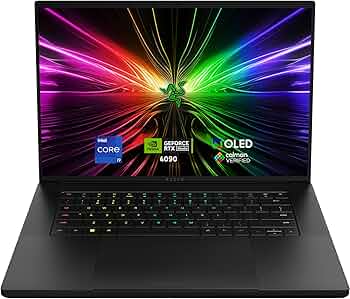
Are you an AI enthusiast, developer, or researcher constantly battling ‘Out of Memory’ errors when pushing your models? Does your current laptop choke on complex Stable Diffusion workflows or slow LLM inference to a crawl? I know the frustration all too well, having spent countless hours optimizing code only to be bottlenecked by hardware. That’s why I took the plunge with the Razer Blade 16, equipped with the monstrous RTX 4090, to see if this premium machine truly lives up to its promise as an ultimate mobile AI workstation.
Is this high-end gaming laptop a justifiable investment for AI power users? Let’s dive deep into my honest experience and detailed analysis.
At a Glance: Key Specifications for AI Workloads
First, let’s look at the core specifications of the Razer Blade 16 (RTX 4090), with a particular focus on the GPU specs crucial for AI tasks.
| Feature | Specification |
|---|---|
| GPU | NVIDIA GeForce RTX 4090 Laptop (Up to 175W TGP) |
| VRAM | 16GB GDDR6 |
| CUDA Cores | 9728 |
| CPU | Intel Core i9-13950HX / 13980HX |
| RAM | Up to 64GB DDR5 |
| Display | 16-inch QHD+ (2560×1600) 240Hz |
| Est. Price | $3500+ (Varies by configuration & region) |
Performance Deep Dive: Can it Handle Your Toughest AI Tasks?
On paper, the specs are intimidating. But what about real-world AI performance? My experience with the Razer Blade 16 (RTX 4090) in AI tasks can be summed up in one word: ‘Impressive.’
Stable Diffusion: Blazing Fast Image Generation, No More OOM Errors!
- Image Generation Speed: For 512×512 images with 20 steps using SD 1.5, I consistently saw generation times of 2-3 seconds. Even with SDXL or higher resolutions like 1024×1024, the process remained remarkably smooth. This felt comparable to a desktop RTX 3080. The dreaded ‘Out of Memory’ errors were practically non-existent.
- Advanced Workflows: Running complex ControlNet models, multiple LoRAs, and high-batch sizes simultaneously proved no challenge. This laptop truly shines for AI artists and researchers exploring intricate generative models.
LLMs: Running Local Models with Surprising Efficiency
- Model Compatibility & Speed: Thanks to the 16GB VRAM, running medium-sized LLMs like LLaMA-7B/13B and Mistral locally was a breeze. Token generation speed was very responsive, making it ideal for on-the-go code generation, text summarization, or interactive AI assistants. While 70B+ models are still largely out of reach for a laptop, this offers top-tier mobile performance.
Python Deep Learning Training: Fine-Tuning and Prototyping on the Go
- Training Environment: I tested PyTorch and TensorFlow for deep learning model training. For fine-tuning existing models on smaller datasets or rapid prototyping, the Blade 16 delivered excellent performance. However, for training large models from scratch on multi-gigabyte datasets, a dedicated desktop workstation or cloud GPUs with more VRAM and sustained power remain superior. It’s a fantastic companion for development, not a full-scale training rig.
Pros & Cons: The Sharp Edge and the Blunt Reality
Here’s my honest breakdown of the advantages and disadvantages after using it extensively.
✨ The Edge (Pros)
- Unmatched Mobile AI Performance: The 16GB VRAM RTX 4090 offers the best AI performance you can get in a laptop today.
- Powerful CPU: The Intel i9-139xxHX series handles AI pre-processing and general computing tasks with exceptional multitasking capabilities.
- Stunning Display: The high-resolution, high-refresh-rate display enhances both work and entertainment.
- Premium Build Quality: Solid, sleek aluminum chassis feels incredibly premium, elevating it beyond a ‘gaming laptop.’
- Effective Thermal Management: Despite its power, the cooling system does a respectable job, allowing for sustained performance without severe throttling.
💔 The Blunt Side (Cons)
- Exorbitant Price Tag: This is the biggest barrier. Value for money is lower compared to a desktop system of similar capabilities.
- Limited Battery Life Under Load: High-performance AI tasks demand constant power, making tethered usage a must for extended sessions.
- Weight and Bulk: While ‘portable’ for its class, it’s still a heavy and bulky laptop, not ideal for daily light commuting.
- Fan Noise: Under heavy AI load, the fans can get quite loud, which might be distracting in quiet environments.
- Not a Full Desktop Replacement: While 16GB VRAM is good, it cannot fully replace a desktop RTX 4090 (24GB VRAM) for truly massive model training.
Verdict: Who Needs This and Who Should Skip It?
The Razer Blade 16 (RTX 4090) is undoubtedly one of the finest mobile AI workstations available. However, it’s not for everyone.
👍 Highly Recommended For:
- Mobile AI Developers/Researchers: Those who need powerful AI inference, prototyping, and fine-tuning capabilities on the go.
- Serious Stable Diffusion & AI Artists: If you demand rapid, high-quality image generation and complex workflow handling.
- Users Seeking Performance & Portability: If you want desktop-class performance in a (somewhat) portable form factor and have the budget.
👎 Consider Alternatives If:
- You’re on a Tight Budget: You can build a significantly more powerful desktop system for AI tasks at a similar or lower price.
- 24GB+ VRAM is Essential: For training truly massive models from scratch, a desktop RTX 4090 or cloud GPUs are more suitable.
- Portability & Silence are Your Top Priorities: If you prefer a lighter, quieter laptop for less demanding tasks.
I hope my honest review helps you decide if the Razer Blade 16 (RTX 4090) is the right beast for your AI endeavors. For the right user with the right budget, it truly can be a game-changer!
🏆 Editor’s Choice
Razer Blade 16
Best value model optimized for AI tasks
* Affiliate disclaimer: We may earn a commission from purchases.
#Razer Blade 16 #RTX 4090 laptop #AI laptop #Stable Diffusion #Deep Learning